Users
The following information is for Admin users only.
Users, the heart of any account, are managed in . Each user is set up with a device, phone number, calling plan, etc. If Voice Portal Access is enabled in the user's Settings tab, they can manage their account settings in the end user portal.
To view and manage the settings for a specific user, locate and select their name in the table below.
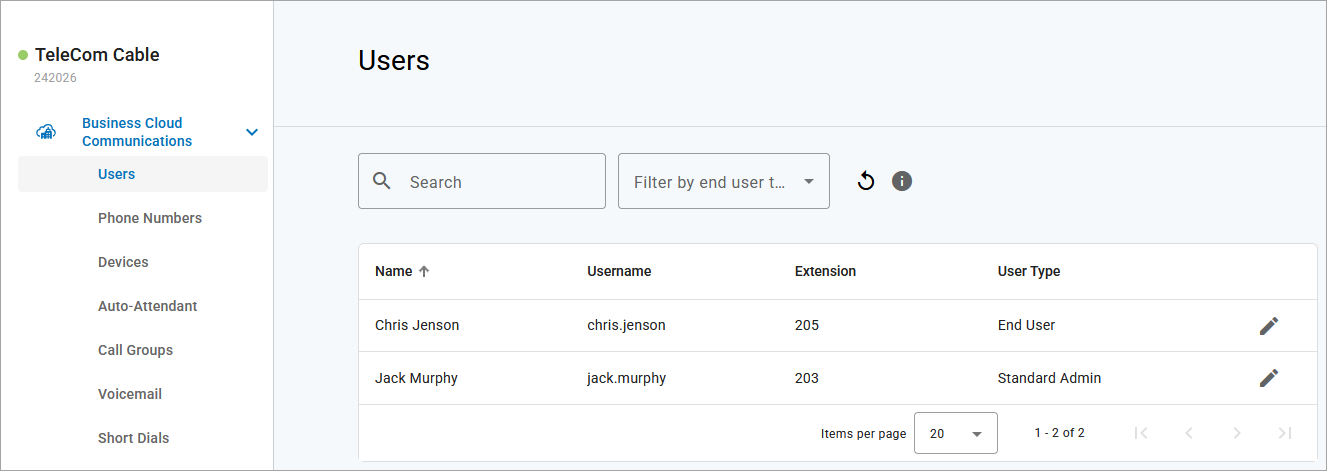
Field | Description |
|---|---|
Search Filter | Filter the displayed users by username, first or last name, extension, device, MAC address, phone number, caller ID number, or user tag. |
End User Type Filter | From the menu next to the search bar, select a user type to filter the list by.
|
Name | The user's first and last name. |
Username | Their Voice Portal username or email address, if it's being used as their username. If this is blank, the user does not have access to the Voice Portal. |
Extension | The dialable extension assigned to the user on the account. |
User Type | Identifies whether the user is a Super Admin, Advanced Admin, Standard Admin, Basic Admin, or End User. This determines the level of access the user has to the Voice Portal. See also:BCC Admin User Types |
Edit | Select a user or click Edit to view and manage their settings in each tab: Calls, Devices, Settings, and Voicemail. |