Add Short Dial Range
A short dial range is used to assign short dials to sequential phone numbers. For example, if the starting number is (214) 555-8536, and the range is 2000 to 2004, five short dials will be set up as follows:
(214) 555-8536: 2000
(214) 555-8537: 2001
(214) 555-8538: 2002
(214) 555-8539: 2003
(214) 555-8540: 2004
This is most frequently used to set up extension dialing to an on-site PBX. For example, if an account has a PBX with sequential phone numbers ending in 1000–1250, they can add a short dial range of 1000 to 1250 to match the last 4 digits of the phone numbers.
Short dials can be mapped to any on- or off-net phone number, so be sure that you own the complete range of sequential phone numbers to avoid routing calls to an unknown third party.
Follow the steps below to add a short dial range:
Go to Business Cloud > Short Dials.
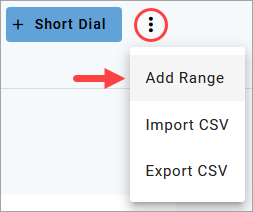
Click the menu at the top right and select Add Range.
In the Add Short Dial Range popup, enter the starting and ending short dials. The range must have less than 250 numbers. In the example below, 25 short dials will be created starting with 200 and ending with 225.
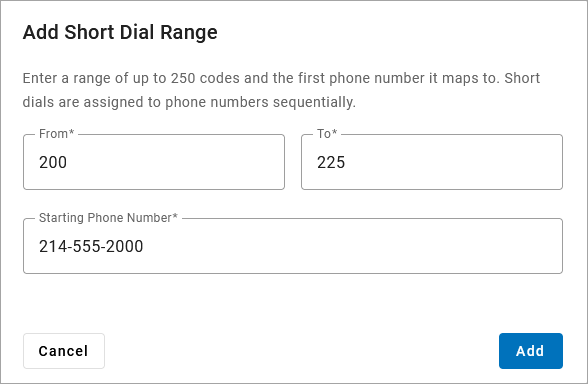
Enter the starting phone number.
Click [Add]. The short dials are added to the account.
Troubleshooting
Multiple safeguards are in place to prevent short dials from interfering with other features on the account. If you get an error when adding a short dial, the error message should tell you the problem to correct. Once you fix it, try adding the short dial(s) again.
The most common errors include:
Short dial overlaps with an existing short dial or extension.
Short dial begins with an N11 service number, such as 311, 411, 911, etc.
Short dial numbers are too long or too short; they must be the same length as extensions on the account.
Add Description
To add a description to any of these short dials, click the pencil icon on the right, enter a description, then click [Save]. This step is optional. See Manage Short Dials for details.