Queue Announcements
Queue Announcements are a series of prompts, messages, or music that callers hear when they reach a hunt group or queue. You can assign up to three custom announcements to each queue, allowing you to fully customize the caller experience. The right message, voice, and background music can turn an annoying experience into an engaging and informative one, and even help you build stronger relationships with your customers.
Every team has different needs, so each queue will need different messages. Before you record or upload a variety of prompts, consider how they will flow together and which messages might be switched out occasionally. For example, the message scripts might be different if the flow is team greetings > hold music > promotional message versus promotional message > team greetings > hold message.
When a call enters the queue, the Intro Prompt and Primary Message will play, then the call will ring an available user. If the user does not answer, the queue announcements are resumed
Queue Announcements must be added to the Media Files library before they can be assigned to queues. Admin end users can change the announcements assigned to a queue at any time.
Go to Call Groups > Queues.
Select the queue you want to modify or add a new one.
Under Queue Announcements, select the files you want to apply to this queue from the Media Files library. All prompts are optional, but we recommend assigning a Primary message at minimum.
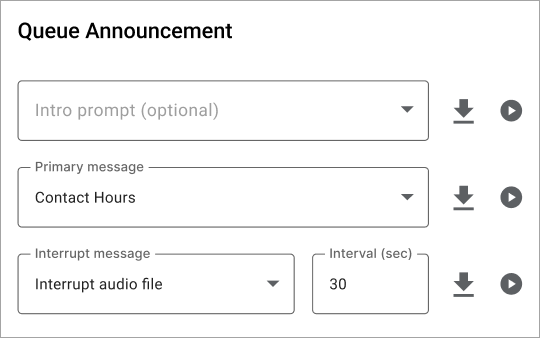
Queue Announcement
Description and Examples
Intro prompt
This prompt is played immediately once the user enters the queue, before routing to a caller. If the Intro prompt isn’t set, the primary message plays first.
Team Greeting: Thank you for calling the Billing department.
Outage Notification: We are currently experiencing high call volumes due to a service outage in the foothills. Our technicians are on site and expect service to be restored by 2:00 p.m.
Primary message
This message begins immediately after the intro prompt and plays on a loop until the call is answered. It is most often a brief message followed by standard hold music (in the same audio file). If the Primary message is not set, callers hear the Music On Hold configured for the queue.
Generic Hold: Please hold while you are connected to the next available representative. Your call will be recorded for quality and training purposes.
After-Hours: The Billing department is currently closed. Please call back during regular business hours, which are 9 AM to 5 PM, Monday through Friday.
Interrupt message
This message interrupts the primary message at specific intervals to help keep callers engaged while they wait. Use it to provide reassurance, educate on a particular topic, promote special offers, and more.
Extended Hold: Thank you for holding. All of our agents are busy assisting other customers. If your issue is urgent, please stay on the line. For general inquiries, please open at ticket on our website at www.company.com and we'll get back to you as soon as possible.
Business Hours: COMPANY is open Monday through Saturday from 11:00 a.m. to 8:00 p.m. Discount tickets are available on our website at www.company.com.
Information: Did you know you can manage your account online? Visit [website] for more information.
Promotion: Our summer sale is in full force! For a limited time, customers who set up an in-person demo will get 15% off their order. Ask us for details.
Promotion: While you wait, did you know we offer a variety of payment options, including credit cards, PayPal, and Apple Pay? Choose the one that works best for you.
Interval (seconds)
If an interrupt message is selected, enter the number of seconds after which the message will be played.
Click [Save].