Devices
The devices on your system—like all of your phones—are a key component to communicating in your organization. The more people you have, the more devices you’ll need. However, all of this can be easily managed, from resetting encryption keys, to swapping devices, to configuring a device's line settings.
To view and manage all devices on an account, go to .
Here you can see all the devices on the account without having to go to the specific user. To locate a particular device, you can search for the owner’s name, or MAC address. The list can also be sorted by MAC address or device type.
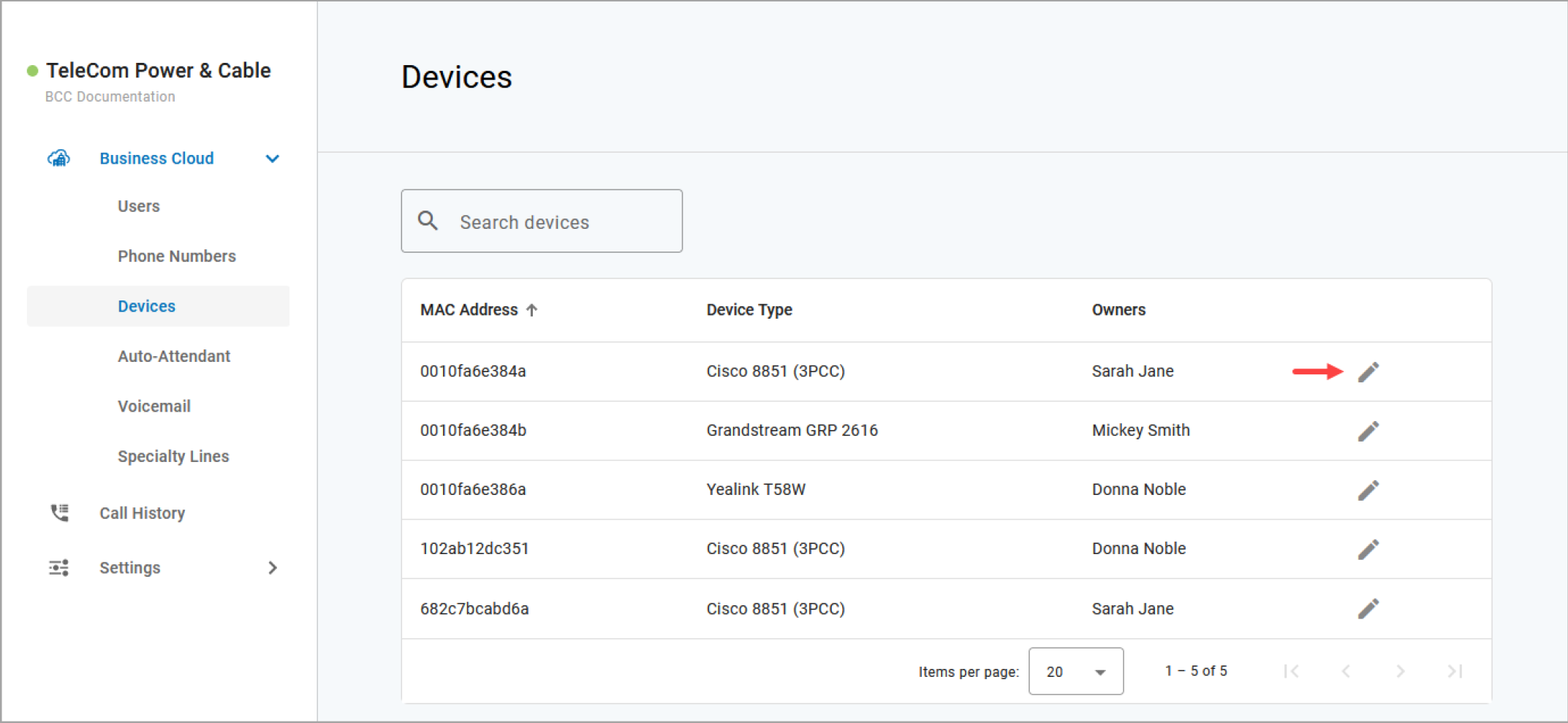
Field | Description |
|---|---|
Search devices | Search for a device here to filter the list displayed below. |
MAC Address | Sort the table via the available devices' unique identifiers on our network. |
Device Type | The device's make and model. |
Owners | User(s) to which the device is assigned. |
Edit | Hover over a device and click |

Note
Only physical devices are listed here. Users with Advanced or Professional licenses may also have UC apps, which are listed in the user's Devices tab.
Edit a Device
To view and manage device settings:
Go to either:
tab
Locate the device you want to manage and click the
 Edit icon on the right.
The breadcrumbs at the top of the page include the name of the user assigned to the device, so you always know what you're working on.
Other Features
The additional features and settings displayed for each device depends on the device type, status, and other factors. For more information, see: