Device Line
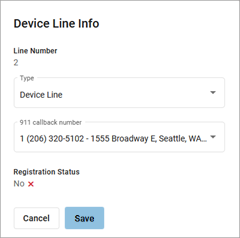
A Device Line functions as an additional line assigned to the owner of the device. It is a traditional line, able to place calls with the user’s outbound caller ID as well as receive or pick up calls sent to the user.
|  |
Faxing on ATAs or EMTA
On an ATA or EMTA, below the Registration status, check the Fax Enabled box to indicate the line is connected to a fax machine. Fax should only be enabled if this line is primarily for receiving faxes as these settings will negatively affect voice quality. | 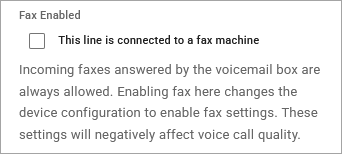 |
Multi-Line Call Handling
Multiple Device Lines for the same user can be set up on a single device, so the user can hold incoming calls and see their other extensions' presence in real-time. In a multi-line device setup, incoming calls will ring to the user's first available (idle) line on the device based on the user's settings:
Feature | Description |
|---|---|
Auto-Attendant | If the user is a member of an Auto-Attendant Group, when a call is received from the group and the user is idle, the call will be delivered to the user's first available line. If the user is already on a call (busy), the incoming call will follow the group's logic and not ring the busy user. |
Call Handling | If a user has SIM Ring or Find Me/Follow Me enabled, the call will follow the routing logic, but it will ring only the first available line on any of the user's registered devices. If a user declines the call on one device, it will stop ringing on all their devices. |
Call Waiting | To take full advantage of Multi-Line Call Handling, Call Waiting should be disabled. Calls to the device will ring the multiple lines in turn until all lines are busy, after which the call will follow the user's Busy setting. If Call Waiting is enabled and a call comes in, the call will be delivered to the first line on any of their registered devices. Calls will not be delivered to any other line on the device. |
Multiple Calls | While on a call, the user can answer subsequent calls by pressing the ringing or flashing key, or by using the Answer function on the phone. Answering a subsequent call will automatically place the active call on hold and connect the selected call. To move between calls, press the line key of the call on hold. |