Call Park
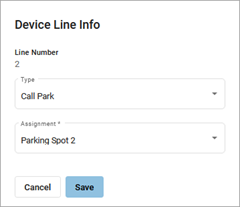
Parking spots can be assigned to a line on the device. This allows a user to take an active call and put the caller in a designated parking spot at the press of a button. The call can then be picked up on any phone that has the parking spot set up in its line configuration by picking up the phone and pressing the line key assigned to the Call Park feature.
To add parking spots to the account, please contact Customer Support.
|  |
Note
Yealink devices use Blind Transfer as the default mode for Call Park.
See also: Call Park Settings and Call Park Star Codes